Your cellar, visualized
and beautifully organized
Track every bottle with a visual cellar grid that mirrors your real setup. Scan labels, get AI insights, and never lose track of a great wine again.
Everything you need to manage your cellar
From scanning a label to tracking drinking windows, Cellar Door handles it all with a beautiful interface powered by AI.
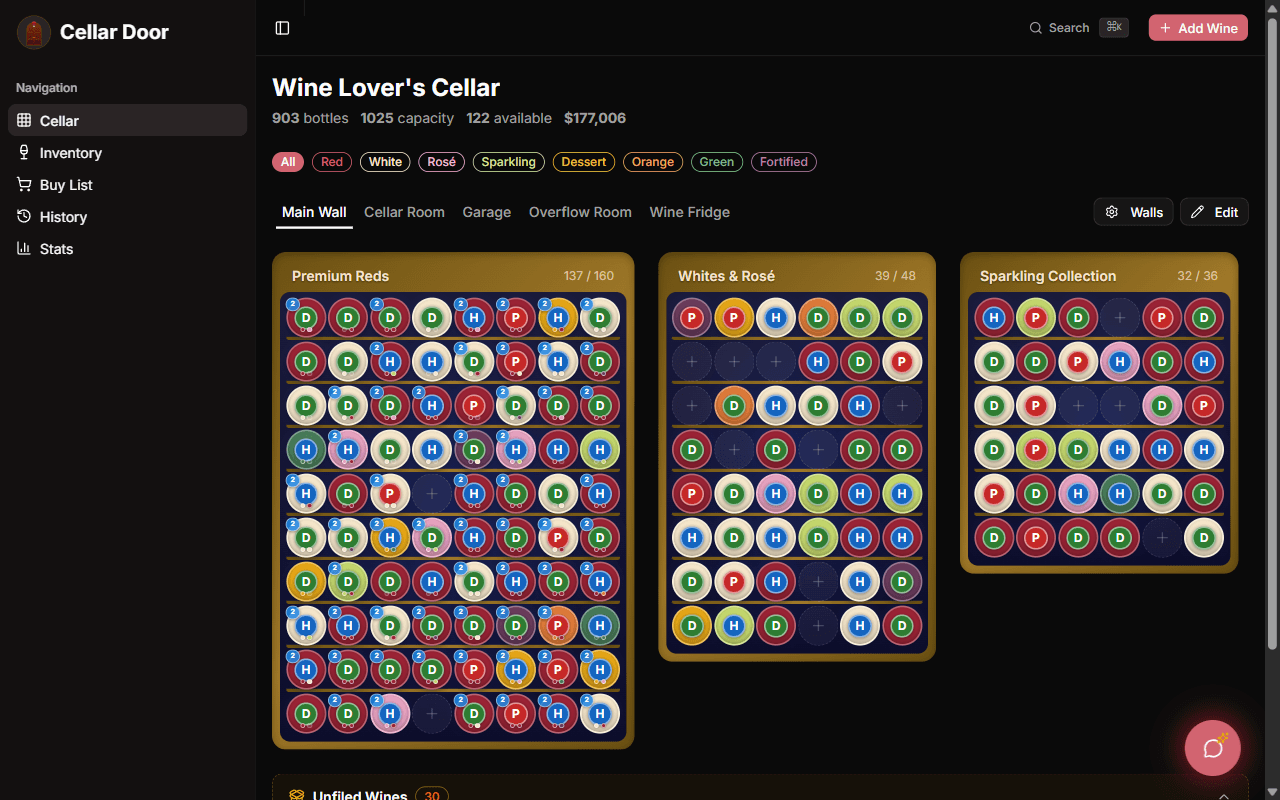
Visual Cellar Grid
A drag-and-drop grid that mirrors your physical wine racks slot-by-slot. Color-coded by wine type, scrollable, and works on phone or desktop.
Learn moreAI Label Scanning
Snap a photo, the AI identifies the wine and fills the form in ~3 seconds. Producer, vintage, region, varietal, alcohol, drink window, critic scores — all auto-filled.
Learn moreCork & Fork
Tell it what you're cooking and AI recommends 3 wines from YOUR cellar that pair well — ranked by match quality.
Learn moreWine List Scanner
At a restaurant? Snap their wine list. We extract every bottle, match against your cellar, and show critic scores + your own ratings inline.
Learn moreCellarChat AI Sommelier
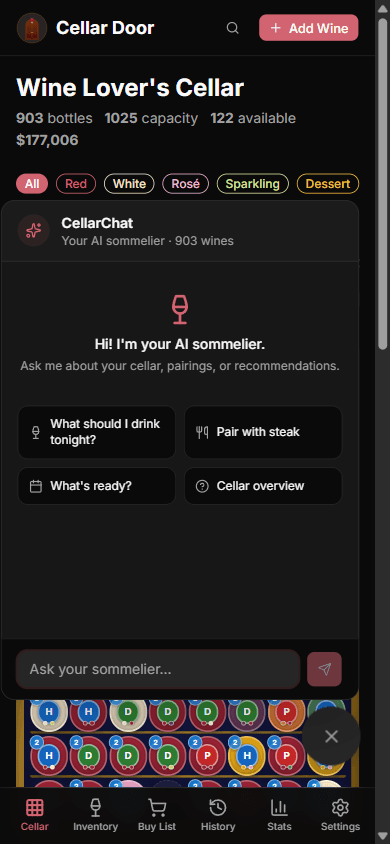
Ask anything about your collection in natural language. "What should I drink tonight?" "Which Bordeaux are at peak?" "What pairs with the duck?"
Learn moreAI Enrichment
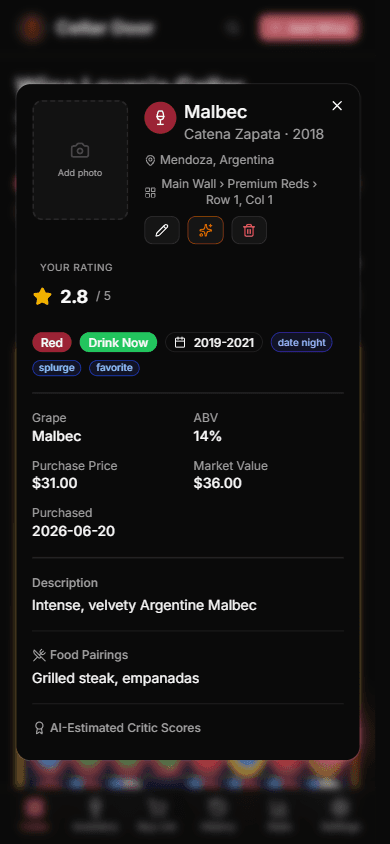
One tap fills tasting notes, food pairings, drinking windows, and AI-estimated critic scores for any wine. Bulk-enrich your entire collection at once.
Learn moreBarcode Scanning
Scan EAN-13 or UPC-A barcodes for instant wine identification. Falls back to label scan if the barcode isn't in any wine database.
Learn moreDrink-Window Guidance
Every wine shows Drink Now, Hold, or Past Peak based on vintage and varietal. Stop forgetting bottles past their prime.
Learn moreCollection Analytics
Interactive charts of your cellar's value, type breakdown, regions, vintages, and consumption trends over time.
Learn moreCommunity CD Scores
Every wine gets a 0–5 score blending AI-estimated critic baselines with peer ratings. See where your collection ranks vs the community.
Learn moreClimate Monitoring
Connect Home Assistant temperature + humidity sensors for live cellar climate. Charts, ideal-range indicators, 30-day history. Cellar Pro.
Learn moreInsurance Report + Backups
Generate a PDF insurance report for your contents policy. Daily encrypted backups + JSON / CSV export. Your data is yours.
Learn moreSee it in action
Beautiful on every screen. From desktop dashboards to quick mobile lookups, Cellar Door adapts to how you manage your collection.
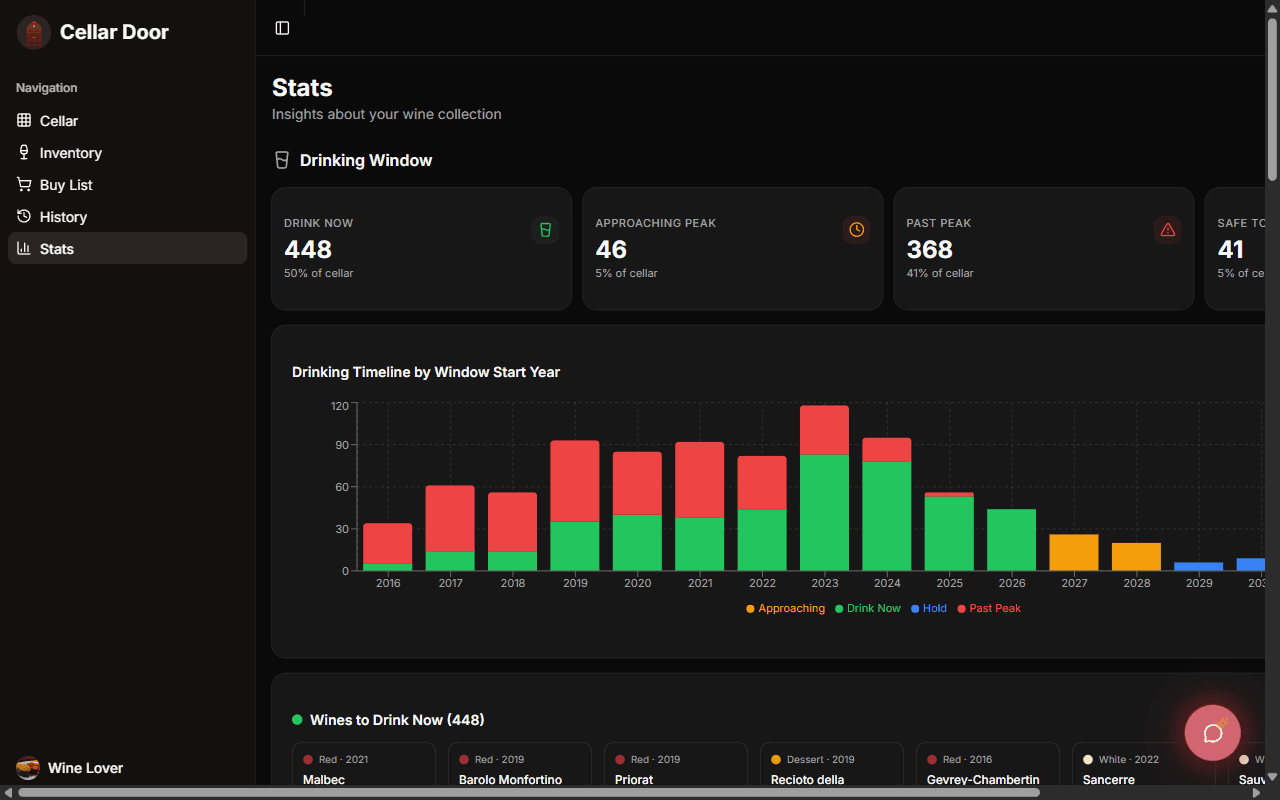
Collection insights at a glance
Track your cellar's value, see drinking window distributions, explore wine type breakdowns, and discover your top regions and producers with beautiful interactive charts.

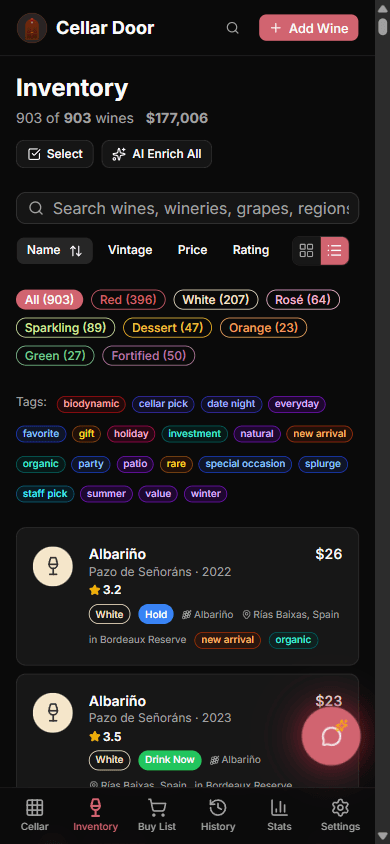
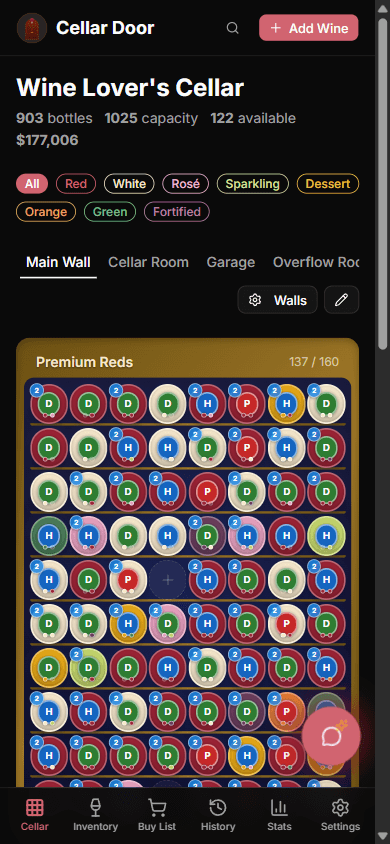
Your cellar in your pocket
Browse your full inventory, manage your visual cellar grid, and scan new wines — all from your phone. The mobile experience is just as powerful as desktop.
Your personal wine expert
CellarChat is your AI sommelier that knows your entire collection. Ask for food pairings, get recommendations for tonight's dinner, find out which wines to drink now, or learn about any bottle in your cellar. It's like having a sommelier on call 24/7.
- Ask natural language questions about your collection
- Get personalized food pairing suggestions
- Find the perfect bottle for any occasion
- Learn tasting notes and wine history
Get started in minutes
Three simple steps to digitize your wine collection.
Set up your cellar
Create cabinets and racks that match your physical setup. Name walls, sections, and rows.
Add your wines
Scan labels with your camera, scan barcodes, or add manually. AI fills in the details.
Track & enjoy
Get drinking window alerts, food pairing suggestions, and collection insights. Never miss a perfect moment.
Who Cellar Door is for
Whether you have 12 bottles or 1,200, Cellar Door grows with your collection. Here's how it fits three kinds of collectors.
The Beginning Collector
You've got 20–80 bottles between a few wine fridges, a kitchen rack, and a closet. You're tired of forgetting what's in the fridge in the basement.
- Snap a label, AI fills in winery, vintage, region in seconds
- Drink-now / hold / past-peak guidance based on vintage
- Unlimited bottles free forever — no card required
The Serious Collector
You've got 200–800 bottles spread across cabinets, racks, and a dedicated cellar room. You buy en primeur, you have first-growth Bordeaux you'll open in 15 years, and you need to know exactly where every bottle is.
- Visual cellar map mirroring your real racks — slot-by-slot
- Live temp + humidity from Home Assistant sensors
- Insurance report PDF for your contents policy
- AI-estimated values from WS / RP / JD / AG critic scores
The Restaurant Sommelier
You manage 150+ bottles for service. You need fast inventory, pour cost analysis, and a way to scan a guest's wine list when they ask “what would you recommend with the lamb?”
- Cork & Fork: AI meal-pairing from your actual cellar
- Pour cost / margin tracker with retail vs cost
- Wine list scanner finds matches in your inventory instantly
- Sommelier mode: let guests vote between bottles
How Cellar Door compares
We respect Vivino and CellarTracker — they're great tools. Here's where Cellar Door is genuinely different, in our own words.
| Feature | Cellar Door | Vivino | CellarTracker |
|---|---|---|---|
| Visual cellar map (slot-by-slot) | limited | ||
| AI label scan (no manual typing) | |||
| AI meal pairing from your cellar | |||
| Restaurant wine list scanner | |||
| Live temp + humidity (Home Assistant) | |||
| AI-estimated WS/RP/JD/AG critic scores | user-rated only | ||
| Insurance report PDF | limited | ||
| Free tier | unlimited | unlimited | unlimited |
| Mobile + web (same data) | mobile-first | web-first | |
| Built for collectors first | social-first |
Comparison reflects the apps as we've experienced them as paying users, as of September 2026. Each app has its strengths — Vivino is unmatched for casual social discovery, CellarTracker for community tasting notes, and Cellar Door for collectors who want a beautiful visual cellar with modern AI built in.
Simple, transparent pricing
Start free. Upgrade when you want the AI features.
Free
Get started
- Unlimited wines
- Manual wine entry
- Visual cellar grid
- Wine history tracking
- Community CD Scores
Cellar+
Most popular
or $99.99/year
14-day free trial
- Unlimited wines
- 300 AI credits / month
- AI label scanning
- AI wine enrichment
- AI sommelier chat
- AI label image search
- Ad-free experience
Cellar Pro
Power user
or $139.99/year
14-day free trial
- Everything in Cellar+
- 1,000 AI credits / month
- Batch AI enrichment
- Home Assistant climate sensors
- REST API access
- Priority support
Self-Hosted
FreeRun the whole app on your own machine — open source under AGPL-3.0, every feature unlocked, no license fee. docker compose up -d brings up the app with its own database, and a single-user mode skips login entirely. Bring your own AI provider key (you pay the provider directly); your data never leaves your hardware.
The whole app is open source. Really.
Not “open core” — the code behind this site is the code in the repo. Subscriptions pay for AI calls, hosting, and the community score dataset, not for access to features.
AGPL-3.0 licensed
Genuinely open source. Read it, run it, modify it, self-host it. The one catch is the AGPL's network copyleft: run a modified version as a service and you share your changes back. The name and logo stay ours — brand your own fork.
Free to self-host, one command
docker compose up -d brings up the app plus its own Postgres — no Vercel, no Neon, no license fee, every feature unlocked. A single-user mode removes even the login; your data stays on your machine.
Your data, exportable
CSV import/export, a public REST API, and a plain Postgres database you can point any tool at. Leaving is a feature, not a punishment.
Or skim the self-hosting guide first.
Everything you wanted to know
Common questions from wine collectors. If yours isn't here, .
Is Cellar Door open source?
Yes — genuinely open source, under the GNU AGPL-3.0. The full source is public: read it, run it, modify it, and self-host it with docker compose up -d (it brings its own Postgres, and a single-user mode skips login entirely), and every feature works with your own AI provider key. The AGPL's network copyleft means anyone who runs a modified version as a service must share their changes back. Subscriptions to the hosted service pay for the AI calls, hosting, and the community CD Score dataset — not for access to the source.
Is Cellar Door really free?
Yes — the free tier tracks unlimited bottles forever, no credit card required. You get the visual cellar map, manual entry, barcode scanning, and basic stats. Cellar+ ($9.99/mo) and Cellar Pro ($13.99/mo) unlock AI label scanning, AI-estimated critic scores, AI meal pairing, and restaurant wine list scanning.
How does AI label scanning actually work?
You snap a photo of a wine label with your phone. We send the image to Google Gemini's vision model, which identifies the winery, name, vintage, region, grape variety, alcohol, drinkability window, and estimated WS/RP/JD/AG critic scores in about 3 seconds. You review the result and tap save. Usually no manual typing at all.
Will my wine data be safe if I cancel my subscription?
Yes. If you cancel, your account simply drops to the free tier — your wines stay exactly where they are; you just lose the AI features. If you'd rather leave entirely, deleting your account immediately and permanently removes your personal data from our live database and cancels any active Stripe subscription in the same action. Our encrypted backups exist only for disaster recovery — they're never used to bring back a deleted account, and your data ages out of them on our backup retention schedule. And you can export your whole collection to CSV or JSON at any time from Settings, so your data is always yours to take with you.
Can I track wines I've already drunk?
Yes — the History view keeps a permanent record of every bottle you've consumed, with optional tasting notes and a final star rating. It's separate from your active inventory but contributes to your stats (favorite regions, total spent, etc.).
Do I need a wine fridge or special storage?
Not at all. Cellar Door works for collections in wine fridges, kitchen racks, basement cellars, closets, or anywhere else. You define your own “walls,” “cabinets,” and “sections” — they don't have to match anything physical, just a layout that makes sense to you.
How does the temperature monitoring work?
Cellar Pro lets you connect Home Assistant temp + humidity sensors using your Home Assistant's public HTTPS address (Nabu Casa works well). Once paired, the live readings show on each cabinet card and you get historical charts in Stats. We don't sell sensors — you can get a Govee or SwitchBot for ~$30 and connect it through Home Assistant. We never store readings on our servers; they live in your HA instance.
What's the deal with Cork & Fork?
Tell it what you're cooking — “mushroom risotto,” “BBQ ribs,” “Tuesday pasta” — and AI recommends 3 wines from your actual cellar that pair well, ranked by match quality. It only suggests bottles you own (no pushing you to buy more).
Can I import my existing cellar from CellarTracker / Vivino / a spreadsheet?
Yes — every plan, including Free, can import a CSV from Settings. It recognizes CellarTracker and Vivino export columns automatically, along with common spreadsheet column names like producer, vintage, and region.
Is there a mobile app or just a website?
The web app at mycellardoor.app works in any modern browser and installs to your home screen as a PWA — full-screen, with camera access for label scanning. Native iOS / Android apps are on the way. Either way it's the same account and the same data, so you can scan a label on your phone and see the wine appear on your laptop instantly.
What about my privacy?
Your wine collection is private to your account by default. We don't share it with anyone, sell data to third parties, or train AI models on your collection. Sharing happens only when you explicitly create a “Guest Cellar” link or use Sommelier mode for a tasting event. Read the full terms at /terms.
If tracking is free and unlimited, what am I actually paying for?
AI. Tracking bottles is cheap to run, so it's free for everyone, forever, with no cap. What costs real money is the AI: label scans, wine-list scans, AI-estimated critic scores, enrichment, and meal pairings each burn paid API calls. The paid tiers fund exactly that — you're paying for the AI you use, not for permission to store your own cellar.
I have feedback / a feature request / found a bug
We read every message. Use the “get in touch” link above, or the in-app feedback button in Settings once you're signed in. We ship updates roughly weekly based on what users actually ask for.
Encrypted backups
Daily, stored off-site
No data sold
Your cellar stays yours
Cancel anytime
Free tier always available
Made by collectors
For collectors
Ready to organize your cellar?
Set up your cellar in minutes and see every bottle at a glance. Free forever, unlimited bottles.